关键词找到return e.isTrue("rweb_client_transaction_id_enabled") && (i.headers["x-client-transaction-id"] = await a(t.host, t.path, t.method)),
然后找到了https://abs.twimg.com/responsive-web/client-web/ondemand.s.cb13130a.js
经过ast解析得到了
!function () {
  try {
    var W = "u" > typeof window ? window : "u" > typeof global ? global : "u" > typeof globalThis ? globalThis : "u" > typeof self ? self : {};
    W.SENTRY_RELEASE = {
      id: "bd5de347106a02d9c8611420fdc1de31bf160b21"
    };
    var n = new W.Error().stack;
    n && (W._sentryDebugIds = W._sentryDebugIds || {}, W._sentryDebugIds[n] = "569088b2-348c-4662-9029-d728fdea8e0b", W._sentryDebugIdIdentifier = "sentry-dbid-569088b2-348c-4662-9029-d728fdea8e0b");
  } catch {}
}();
"use strict";
(globalThis.webpackChunk_twitter_responsive_web = globalThis.webpackChunk_twitter_responsive_web || []).push([[59924], {
  208932(W, n, t) {
    t.d(n, {
      default: () => e
    }), t(28792), t(506533);
    let e = () => {
      let W;
      const [i, k] = [document, window],
        [a, l, O, C, P, p, S, Q, m, q, R, I, G] = [k.Number, k.TextEncoder, k.Uint8Array, W => i.querySelectorAll(W), k.Date, k.Uint32Array, k.crypto.subtle, k.Array.from, k.Math, k.RTCPeerConnection, k.Promise, k.Function, k.getComputedStyle],
        s = W => new O(atob(W).split("").map(W => W.charCodeAt(0))),
        y = W => btoa(Q(W).map(W => String.fromCharCode(W)).join("")).replace(/=/g, ""),
        b = () => s(L(C("[name^=tw]")[0], "content")),
        K = (n, t) => W = W || L(D(C(n))[t[5] % 4].childNodes[0].childNodes[1], "d").substring(9).split("C").map(W => W.replace(/[^\d]+/g, " ").trim().split(" ").map(a)),
        L = (W, n) => W && W.getAttribute(n) || "",
        J = W => typeof W == "string" ? new l().encode(W) : W,
        h = W => S.digest("sha-256", J(W)),
        N = W => (W < 16 ? "0" : "") + W.toString(16),
        D = W => Q(W).map(W => (W.parentElement?.["removeChild"](W), W)),
        H = () => {
          {
            let n = i.createElement("div");
            return i.body.append(n), [n, () => D([n])];
          }
        },
        [j, g, V, M, x] = [W => m.round(W), W => m.floor(W), () => m.random(), W => W.slice(0, 16), () => 0],
        [w, B, E] = [3, 0x644f6370, 4096],
        U = (W, n, t) => n ? W ^ t[0] : W,
        z = (W, n, t) => {
          {
            if (!W.animate) return;
            let e = W.animate(v(n), E);
            e.pause(), e.currentTime = j(t / 10) * 10;
          }
        },
        T = (W, n, t, e) => {
          {
            let r = W * (t - n) / 255 + n;
            return e ? g(r) : r.toFixed(2);
          }
        },
        v = W => ({
          color: ["#" + N(W[0]) + N(W[1]) + N(W[2]), "#" + N(W[3]) + N(W[4]) + N(W[5])],
          transform: ["rotate(0deg)", "rotate(" + T(W[6], 60, 360, true) + "deg)"],
          easing: "cubic-bezier(" + Q(W.slice(7)).map((W, n) => T(W, n % 2 ? -1 : 0, 1)).join() + ")"
        });
      let F,
        X = [],
        A = n => {
          if (!F) {
            let [k, l] = [n[21] % 16, n[27] % 16 * (n[15] % 16) * (n[16] % 16)],
              C = K(".r-1nskx", n);
            new R(() => {
              {
                let t = new q(),
                  e = V().toString(36);
                t.createDataChannel(e), t.createOffer().then(o => {
                  try {
                    {
                      let W = o.sdp || e;
                      X = Q(J([W[n[5] % 8] || "4", W[n[8] % 8]])), t.close();
                    }
                  } catch {}
                }).catch(x);
              }
            }).catch(x);
            let [p, S] = H();
            z(p, C[k], l);
            let m = G(p);
            F = Q(("" + m.color + m.transform).matchAll(/([\d.-]+)/g)).map(W => a(a(W[0]).toFixed(2)).toString(16)).join("").replace(/[.-]/g, ""), S();
          }
          return F;
        };
      return async (W, n) => {
        let u = g((P.now() - NaN) / 1e3),
          o = new O(new p([u]).buffer),
          c = b(),
          d = A(c);
        return y(new O([V() * 256].concat(Q(c), Q(o), M(Q(new O(await h([n, W, u].join("!") + "obfiowerehiring" + d))).concat(X)), [w])).map(U));
      };
    };
    (Object.getOwnPropertyDescriptor(e, "name") || {}).writable || Object.defineProperty(e, "name", {
      value: "default",
      configurable: true
    });
  }
}]);
第零个V() * 256是随机掩码
第一个是c s(L(querySelectorAll("[name^=tw]")[0], "content")),属于标识符,找到了<meta name="twitter-site-verification" content="0VcdiIIH5QjcFDSUuGZ34fedDV+db1TZLPS6udWM1tZF/xxxxxxxx+x2ok/TC7">
第二个 let u = g((P.now() - 1682924400000) / 1e3),时间戳,
第三个
        J = W => typeof W == "string" ? new l().encode(W) : W,
        h = W => S.digest("sha-256", J(W)),
把传入的两个参数和时间戳进行sha-256然后.join("!") + "obfiowerehiring" + d,d参数是
       K = (n, t) => W = W || L(D(querySelectorAll(n))[t[5] % 4].childNodes[0].childNodes[1], "d").substring(9).split("C").map(W => W.replace(/[^\d]+/g, " ").trim().split(" ").map(a)),

      A = n => {
          if (!F) {
            let [k, l] = [n[21] % 16, n[27] % 16 * (n[15] % 16) * (n[16] % 16)],
              C = K(".r-1nskx", n);
            new R(() => {
              {
                let t = new q(),
                  e = V().toString(36);
                t.createDataChannel(e), t.createOffer().then(o => {
                  try {
                    {
                      let W = o.sdp || e;
                      X = Q(J([W[n[5] % 8] || "4", W[n[8] % 8]])), t.close();
                    }
                  } catch {}
                }).catch(x);
              }
            }).catch(x);
            let [p, S] = H();
            z(p, C[k], l);
            let m = G(p);
            F = Q(("" + m.color + m.transform).matchAll(/([\d.-]+)/g)).map(W => a(a(W[0]).toFixed(2)).toString(16)).join("").replace(/[.-]/g, ""), S();
          }
          return F;
        };
首先取之前的meta特定位置,求一些基础数据
let [k, l] = [n[21] % 16, n[27] % 16 * (n[15] % 16) * (n[16] % 16)],
然后C = K(".r-1nskx", n);
C(".r-1nskx") 找出页面上所有 .r-1nskx 元素。
t[5] % 4 用种子字节的第 5 位决定选第几个元素。
取它的 childNodes[0].childNodes[1],读 d 属性。
substring(9) 去掉前 9 个字符。
按 "C" 切分。
每段里的数字提取出来,用 Number 转成数值数组。
K = (n, t) =>
  W = W ||
  L(
    D(C(n))[t[5] % 4]
      .childNodes[0].childNodes[1],
    "d"
  )
  .substring(9)
  .split("C")
  .map(...)
用RTCPeerConnection创建一个连接,得到指纹信息,然后按种子信息取值
                let t = new q(),
                  e = V().toString(36);
                t.createDataChannel(e), t.createOffer().then(o => {
                  try {
                    {
                      let W = o.sdp || e;
                      X = Q(J([W[n[5] % 8] || "4", W[n[8] % 8]])), t.close();
                    }
                  } catch {}
                }).catch(x);
创建一个dom元素
            let [p, S] = H();
            z(p, C[k], l);

            z = (W, n, t) => {
  if (!W.animate) return;
  let e = W.animate(v(n), E);
  e.pause();
  e.currentTime = j(t / 10) * 10;
}
其中v是
v = W => ({
  color: [
    "#" + N(W[0]) + N(W[1]) + N(W[2]),
    "#" + N(W[3]) + N(W[4]) + N(W[5])
  ],
  transform: [
    "rotate(0deg)",
    "rotate(" + T(W[6], 60, 360, true) + "deg)"
  ],
  easing: "cubic-bezier(" +
    Q(W.slice(7)).map((W, n) => T(W, n % 2 ? -1 : 0, 1)).join() +
    ")"
})
就是让 div 按 v(n) 的关键帧播放 x 秒,但随后立即暂停并设置 currentTime,让浏览器停留在某个由种子数据决定的动画进度上,再读取计算后的样式作为指纹。
其中数值来源
let [k, l] = [n[21] % 16, n[27] % 16 * (n[15] % 16) * (n[16] % 16)],
k是取SVG的数据,判断取哪行的index,l是frameTime
    let m = G(p);
            F = Q(("" + m.color + m.transform).matchAll(/([\d.-]+)/g)).map(W => a(a(W[0]).toFixed(2)).toString(16)).join("").replace(/[.-]/g, ""), S();
获取到属性元素,提取数字,保留两位小数,再转数字,最后 String(16) 转十六进制,然后.join("").replace(/[.-]/g, "")
所以整体顺序是
[随机掩码]
[页面种子 c]
[时间戳 4 字节]
[SHA-256 前 16 字节]
[WebRTC 2 字节]
[版本 3]
然后xor再base64,所以随机掩码可以伪造,页面种子不可以,时间戳随便算,WEBRTC无法确定,版本3固定,那SHA-256 前 16 字节很难被检测,我们可以跳过很多计算细节,直接得到简易算法
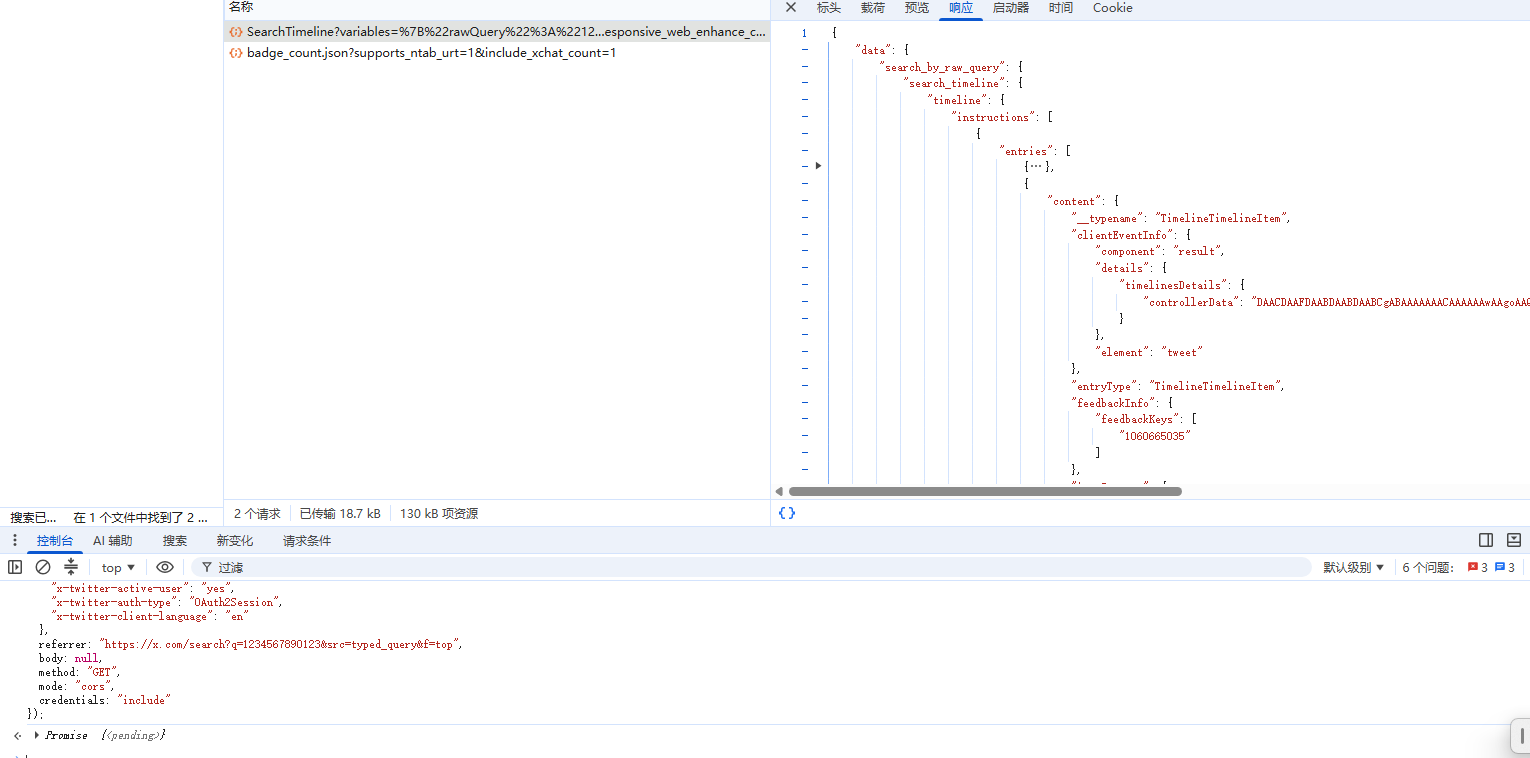
这里推荐测试d用搜索的SearchTimeline接口,因为有cf盾,最好用fetch直接在浏览器测试
那么问题来了
1.为什么CSS在不同浏览器上精度不同,有细微差异,依然可以通过?
我们可以看到e.currentTime = j(t / 10) * 10,r.toFixed(2),F = Q(("" + m.color + m.transform).matchAll(/([\d.-]+)/g)).map(W => a(a(W[0]).toFixed(2)).toString(16)).join("").replace(/[.-]/g, ""), S();
等代码,在处理之前都会调用toFixed来进行抹除精度,保证推特的后端跟本地计算一致来通过,如果通不过就算用户该死了
2.为什么用CSS不用canvas?
canvas在用户浏览器实现多种多样,可能出现巨大差异,被浏览器/插件进行扰动或直接屏蔽放追踪,相比之下CSS兼容性更好,同时实现算法更加困难
目前市面上求动画无非两类
1.直接丢浏览器里执行
2.每一个都直接硬生生通过算出来
这两种方案github开源都有,第一种只能相对较为容易,所以我们要采用第二种方案实现
让我们再读一下结构
[随机掩码]
[页面种子 c]
[时间戳 4 字节]
[SHA-256 前 16 字节]
[WebRTC 2 字节]
[版本 3]
随机掩码 = Math.random() * 256
页面种子 = new Uint8Array(atob(content).split("").map(ch => ch.charCodeAt(0)));
时间戳 4 字节
const timeSeconds = Math.floor((Date.now() - 1682924400000) / 1000);
const timeBytes = Buffer.alloc(4);
timeBytes.writeUInt32LE(timeSeconds, 0)
WebRTC = randomBytes(2)
版本 = 3
接下来着重分析SHA-256 前 16 字节
hashInput = `${method}!${path}!${timeSeconds}obfiowerehiring${d}`
digest = SHA-256(hashInput)
前16字节 = digest[0:16]
就可以得到例如GET!/i/api/graphql/PusO6nN_nUSAsfJktZJd9w/SearchTimeline!103251094obfiowerehiring然后接d,所以着重在d值计算上
首先第一个问题,k和l的来源是怎么取的?
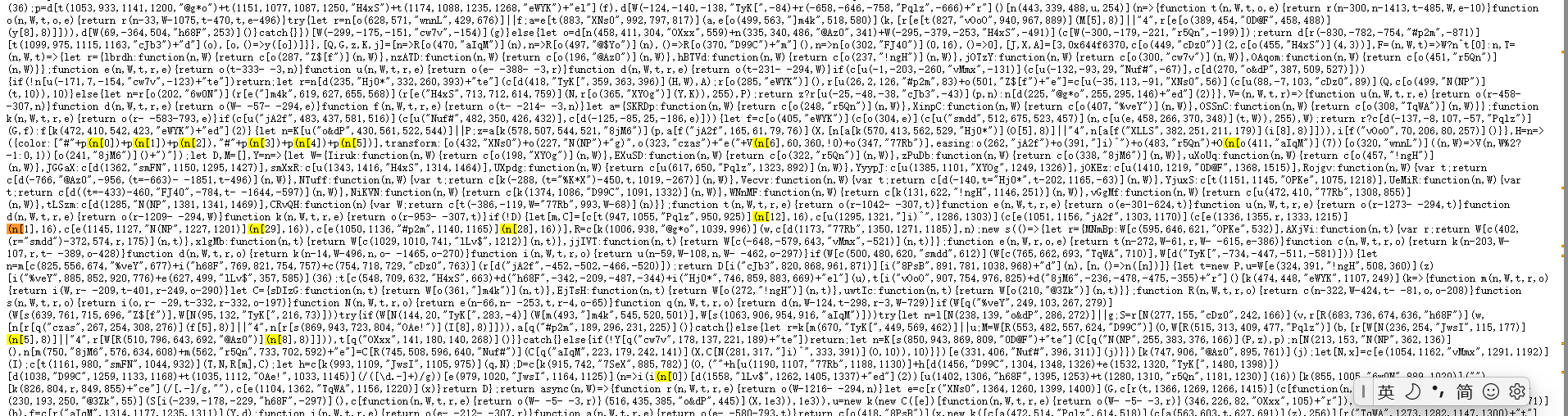
也是具有两条路线
1.正则匹配,直接根据正则/\(\w\[(\d{1,2})\],\s*16\)/g找出来
2.ast解析,之前处理of用的该种方式
我们就采用第一种了,然后一路补计算就好了
比较重要的就是关于CSS的计算规则,我们多关心这里,参考https://blog.nest.moe/posts/twitter-header-part-4#%E7%B2%BE%E5%BA%A6%E9%97%AE%E9%A2%98,这里尽量多靠AI辅导去读浏览器源码
1.cubic_bezier 缓动函数
给输入时间x,解出来时间t,然后得出进度y
WebKit/Source/WebCore/platform/graphics/UnitBezier.h at main · WebKit/WebKit · GitHub
        double solve(double x, double epsilon)
        {
            if (x < 0.0)
                return 0.0 + startGradient * x;
            if (x > 1.0)
                return 1.0 + endGradient * (x - 1.0);
            return sampleCurveY(solveCurveX(x, epsilon));
        }
                // Given an x value, find a parametric value it came from.
        double solveCurveX(double x, double epsilon)
        {
            double t0 = 0.0;
            double t1 = 0.0;
            double t2 = x;
            double x2 = 0.0;
            double d2 = 0.0;
            int i = 0;

            // Linear interpolation of spline curve for initial guess.
            double deltaT = 1.0 / (CUBIC_BEZIER_SPLINE_SAMPLES - 1);
            for (i = 1; i < CUBIC_BEZIER_SPLINE_SAMPLES; i++) {
                if (x <= splineSamples[i]) {
                    t1 = deltaT * i;
                    t0 = t1 - deltaT;
                    t2 = t0 + (t1 - t0) * (x - splineSamples[i - 1]) / (splineSamples[i] - splineSamples[i - 1]);
                    break;
                }
            }

            // Perform a few iterations of Newton's method -- normally very fast.
            // See https://en.wikipedia.org/wiki/Newton%27s_method.
            double newtonEpsilon = std::min(kBezierEpsilon, epsilon);
            for (i = 0; i < kMaxNewtonIterations; i++) {
                x2 = sampleCurveX(t2) - x;
                if (std::abs(x2) < newtonEpsilon)
                    return t2;
                d2 = sampleCurveDerivativeX(t2);
                if (std::abs(d2) < kBezierEpsilon)
                    break;
                t2 = t2 - x2 / d2;
            }
            if (std::abs(x2) < epsilon)
                return t2;

            // Fall back to the bisection method for reliability.
            while (t0 < t1) {
                x2 = sampleCurveX(t2);
                if (std::abs(x2 - x) < epsilon)
                    return t2;
                if (x > x2)
                    t0 = t2;
                else
                    t1 = t2;
                t2 = std::midpoint(t0, t1);
            }

            // Failure.
            return t2;
        }
       double sampleCurveY(double t)
        {
            return ((ay * t + by) * t + cy) * t;
        }
这里简单来说先进行采样,然后通过斜率/误差逼近,失败再回退二分,这里市面实现只有二分,我们也只实现二分即可,但是需要注意精度遵守1e-7
function solve(value, minVal, maxVal, rounding) {
  const result = (value * (maxVal - minVal)) / 255 + minVal;
  return rounding ? Math.floor(result) : Number(result.toFixed(2));
}

function sampleCurveX(t, x1, x2) {
  const cx = 3 * x1;
  const bx = 3 * (x2 - x1) - cx;
  const ax = 1 - cx - bx;
  return ((ax * t + bx) * t + cx) * t;
}

function sampleCurveY(t, y1, y2) {
  const cy = 3 * y1;
  const by = 3 * (y2 - y1) - cy;
  const ay = 1 - cy - by;
  return ((ay * t + by) * t + cy) * t;
}

function cubicBezierYByBisection(xTarget, curves, epsilon = 1e-7) {
  const [x1, y1, x2, y2] = curves;
  let lo = 0;
  let hi = 1;

  while (hi - lo > epsilon) {
    const mid = (lo + hi) / 2;
    const xMid = sampleCurveX(mid, x1, x2);
    if (Math.abs(xMid - xTarget) < epsilon) {
      return sampleCurveY(mid, y1, y2);
    }
    if (xMid < xTarget) lo = mid;
    else hi = mid;
  }

  return sampleCurveY((lo + hi) / 2, y1, y2);
}
  const curves = frameRow.slice(7).map((value, index) =>
    solve(value, index % 2 ? -1 : 0, 1, false),
  );
  const val = cubicBezierYByBisection(targetTime, curves);
同理
inline float interpolateComponentWithoutAccountingForNaN(float componentFromColor1, double color1Multiplier, float componentFromColor2, double color2Multiplier)
{
    return (componentFromColor1 * color1Multiplier) + (componentFromColor2 * color2Multiplier);
}
按进度取开始颜色到结束颜色,得color = from * color1Multiplier + to * color2Multiplier
TransformationMatrix& TransformationMatrix::rotate(double angle, RotationSnapping snapping)
{
    if (!std::fmod(angle, 360))
        return *this;

    return rotateRadians(deg2rad(angle), snapping);
}

TransformationMatrix& TransformationMatrix::rotateRadians(double angle, RotationSnapping snapping)
{
    double sinZ = snapping == RotationSnapping::Snap90degRotations ? roundEpsilonToZero(sin(angle)) : sin(angle);
    double cosZ = snapping == RotationSnapping::Snap90degRotations ? roundEpsilonToZero(cos(angle)) : cos(angle);
    multiply({ cosZ, sinZ, -sinZ, cosZ, 0, 0 });
    return *this;
}
这里是将开始角度和结束角度归一求出角度,然后算出矩阵,最后根据矩阵求d,可以得出
function generateD(frames, keyBytes) {
  if (!frames || !keyBytes) {
    console.log({ frames, keyBytes });
    return "";
  }

  const frameD = frames[keyBytes[5] % 4];
  const frameRows = parseFrameRows(frameD);

  const rowIndex = keyBytes[ONDEMAND_INDICES[0]] % 16;
  const frameRow = frameRows[rowIndex];

  let frameTime = 1;
  for (const idx of ONDEMAND_INDICES.slice(1)) {
    frameTime *= keyBytes[idx] % 16;
  }
  frameTime = Math.round(frameTime / 10) * 10;
  const targetTime = frameTime / TOTAL_TIME;
  const curves = frameRow.slice(7).map((value, index) =>
    solve(value, index % 2 ? -1 : 0, 1, false),
  );
  const val = cubicBezierYByBisection(targetTime, curves);

  // Color: interpolate from RGB to RGB, clamp, round, hex
  const fromColor = frameRow.slice(0, 3).concat(1).map(Number);
  const toColor = frameRow.slice(3, 6).concat(1).map(Number);
  const color = interpolate(fromColor, toColor, val).map((value) =>
    Math.min(255, Math.max(0, value)),
  );

  // Rotation: 0deg -> target angle at progress val, then matrix
  const toRotation = solve(frameRow[6], 60, 360, true);
  const rotation = toRotation * val;
  const rad = (rotation * Math.PI) / 180;
  const matrix = [Math.cos(rad), Math.sin(rad), -Math.sin(rad), Math.cos(rad)];

  const strArr = color
    .slice(0, -1)
    .map((value) => Math.round(value).toString(16));

  for (const value of matrix) {
    let rounded = Number(value.toFixed(2));
    if (rounded < 0) rounded = -rounded;
    const hexValue = floatToHex(rounded);
    strArr.push(
      hexValue.startsWith(".") ? `0${hexValue}`.toLowerCase() : hexValue || "0",
    );
  }

  strArr.push("0", "0");
  const d = strArr.join("").replace(/[.-]/g, "");

  console.log({
    rowIndex,
    frameTime,
    targetTime,
    curves,
    val,
    frameRow,
    d,
  });

  return d;
}
得到结果,bypass








 置顶卡
置顶卡 沉默卡
沉默卡 照妖镜
照妖镜